


A huge thank you to all paid subscribers and many thanks also to those who bought me a coffee. Taming the Trunk is 100% reader supported, no ads or commission links and your support is really appreciated.
This week on Ask Me Anything about Evernote we have a question from Mark.
If you have a question you’d love an answer to then leave it in the comments below and I’ll add it to the list.
Mark asks
How do I get rid of the speaker names when I transcribe audio? There’s only me.
The audio transcription feature in Evernote is pretty cool and by default it lists the speakers in the audio even if its just you.
It’s easy to turn this off when you transcribe the audio.
Just click the dropdown arrow on the transcribe button and there’s a toggle to turn off speaker recognition.
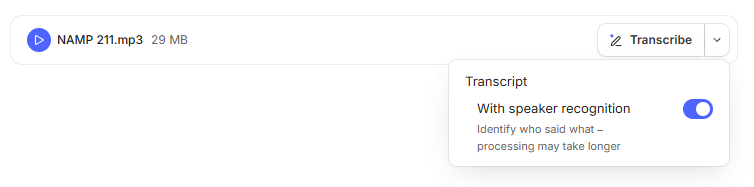
If you switch it off Evernote will remember that setting next time you transcribe some audio, this little tweak came in an update over the last week or two.
If you already have some audio that’s been transcribed and you want to get rid of the speakers, you can click the little person icon at the top right of the transcription to regenerate it without speakers.

Likewise, if you have a transcription without speakers and you want to regenerate it with them, then click the person icon.

The choice is yours. You have the transcription with or without speakers and change this once transcribed, full control.
I hope this helps.
Have a great rest of the week
All the best
Jon