


A huge thank you to all paid subscribers and many thanks also to those who bought me a coffee. Taming the Trunk is 100% reader supported, no ads or commission links and your support is really appreciated.
This week on Ask Me Anything about Evernote we have a question from Jill.
If you have a question you’d love an answer to then leave it in the comments below and I’ll add it to the list.
Jill asks
Should I use Two Factor Authorisation (2FA) login? I’ve heard some people say they can’t login after setting it up.
Yes, absolutely, its safe to use.
But, you do need to keep on top of your logins and authenticator apps.
For those who don’t know, Two Factor Authorisation (2FA) is an extra login step to make sure you are the owner of the Evernote account. Much better security.
After you enter your email address and password Evernote will ask you for a 2FA number, usually from an app on your phone.
Enter this number and you’ll be logged in.
Two Factor Authorisation (2FA) is something you need to set up and its a bit of a process.
Login into your account on the web and look for Security Summary in the left menu.
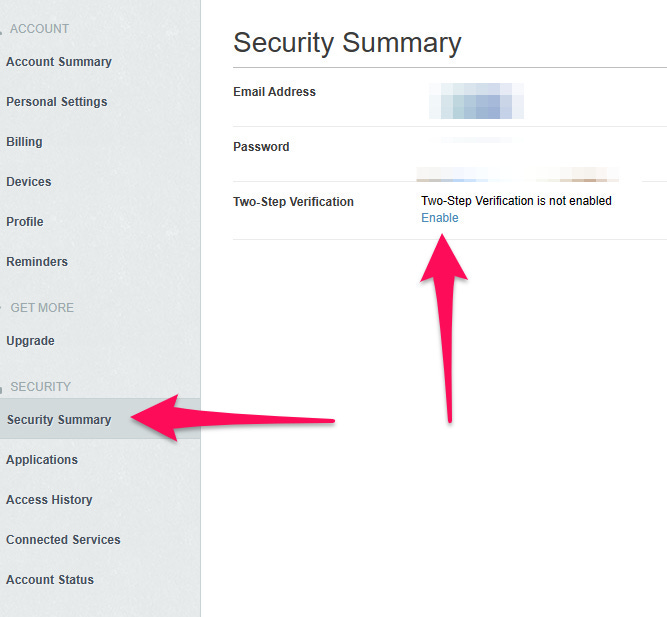
Download an authenticator app, I use Google Authenticator, but there are others.

You can then start setting it up.
I wrote a how to on this ages ago so here’s the full process.
During this process Evernote will give you 10 backup codes and you need to keep these safe and not inside Evernote, preferably inside a password keeper app.
On to the second part of your question. I’ve heard the same complaints as you that folks can’t login and I’ve spoken to a lot of folk having this issue.
Every single time its been down to their own personal management of the authenticator app or their Evernote email address.
The most common issue is when someone has changed phones and not downloaded the authenticator app and can’t remember which Google/Microsoft account the authenticator was attached to.
I spoke to someone who had 15 Google accounts and couldn’t remember which one was used for the authenticator app so they used up all their backup codes logging in.
I also spoke to someone who couldn’t remember setting up any authenticator app but had backup codes and the only way to get the backup codes is to set up the authenticator.
They started using the backup codes to login but didn’t set up 2FA again once logged in, so when all the backup codes were used up they were locked out of the account.
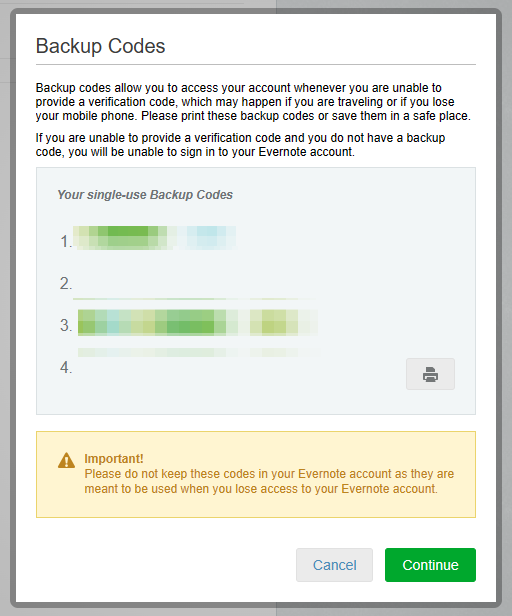
Managing logins and login apps is essential. Knowing what email address or Google account is connected to a 2FA app is essential. Without performing this little bit of admin, you can get locked out.
I recently changed from an Android phone to an iPhone and the process of downloading Google Authenticator for the new phone and setting it up was simple. I just logged into the (correct) Google account and it was there.
The whole idea of the backup codes is so you can login and disable 2FA or set it up again.
If anyone has found themselves locked out of their account due to not having backup codes then read this article on the Evernote support site and fill in this form. They ask for specific information to prove you are the account holder.
I hope that helps Jill.
Don’t worry about setting it up. Just keep the backup codes safe and not in Evernote and make sure you have total access to whichever authenticator app you choose.
Have a great rest of the week
All the best
Jon