


A huge thank you to all paid subscribers and many thanks to Jan who bought me a coffee. Taming the Trunk is 100% reader supported, no ads or commission links and your support is really appreciated.
Newsletter housekeeping: The latest version for PC & Mac is 11.11.2. You can grab it from the download page. Latest mobile version is 11.11.2.
Over the last few days I’ve been playing around with the Evernote AI Assistant (AIA) trying to understand a few new use cases and I found out it can see inside a CSV file.
I presume this is because a CSV file is basically a text file that holds spreadsheet data.
Right now the AIA can’t see inside Excel spreadsheets, but you can always export an Excel as a CSV.
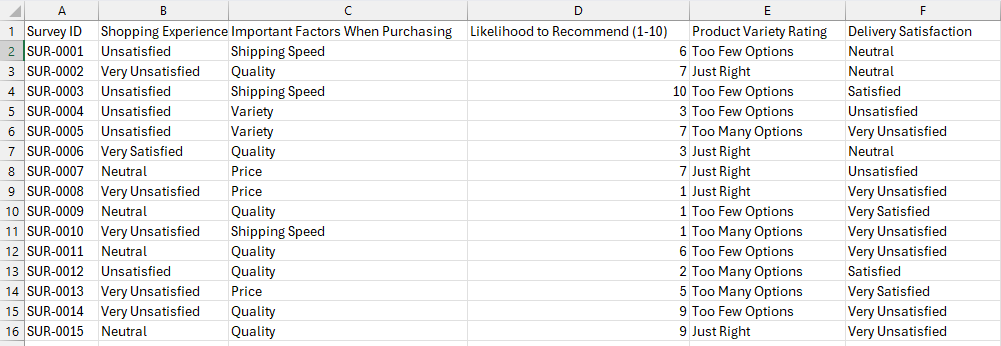
So, what I did was get ChatGPT to create a sample CSV file for me, some survey data for an online store. I tried to think up a real life use case where it would be hard work to look through 100’s or 1000’s of lines of data.

The data looks a little like this.
I then used the following prompt:
Take a look at the data in the CSV file in the open note. Its survey data for an online store. Give me some sentiment analysis and a list of positives and pain points from this data.
It looked at the data and gave me a fairly comprehensive sentiment analysis.
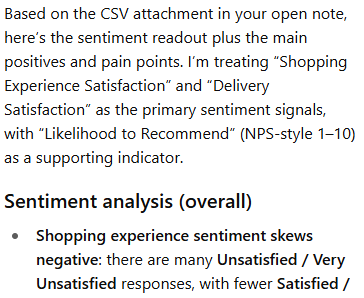
From the data in the survey it told me what customers cared most about.
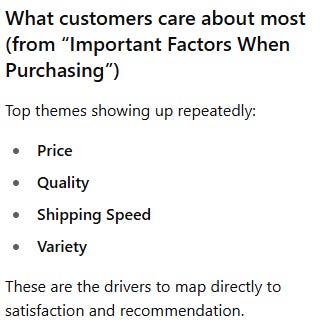
It then went on to give me a list of pain points and positives.
I could also ask it for actual numbers.
Look at the Delivery Satisfaction data and quantify it by the option selected in the survey.
This was the response.

Being able to analyse large amounts of data inside a CSV file is incredibly useful.
In pre AI days we’d of been trawling through this data and writing spreadsheet functions. We can now ask questions in natural language and get an answer.
Would you find this useful? Do you keep much spreadsheet data inside Evernote? Let me know in the comments.
Add note reminders using the AI Assistant
Something new. Make sure you’re on the latest version.
You can now add/edit/remove note reminders using the AIA.
First thing I’ll ask. Do you use note reminders? I’ve pretty much stopped using them since tasks came out. I’d love to hear from folk who still use them and what they use them for. Leave me a comment.
If you do use reminders try an AI prompt like something like this.
Add a reminder to the open note for 28th July 2026 at 9am
This was the response I got.
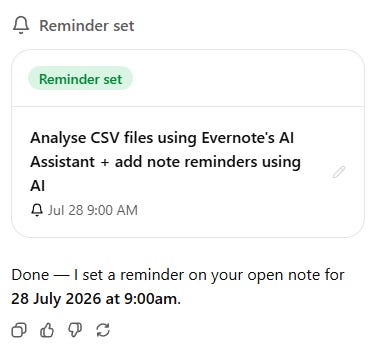
And the reminder was set in the note.

This worked for changing the reminder.
Change the reminder in the open note to July 10th 2026 at 11am.
You can also add reminders to notes that are not open by mentioning them using the ‘@’ symbol.
Add a reminder for July 28th 2026 at 9am to this note @Floating table of contents
This note wasn’t open and was in a different notebook but it added the reminder just fine.
A simple prompt removed the reminder.
Remove the reminder from the open note
I think the key to all of the AI prompting is to make sure you tell the AIA what note to work with, don’t assume it knows. I’ve managed to get much better results this way.
Will you use the AI to set reminders in notes? Let me know in the comments.
Duplicate a close note tabs using right click
Another quick new thing. If you right click a tab you can now duplicate it and also close it.
I would still love to see a mouse wheel click for closing the tab very much the same as I have in my browser. I hope this comes.
Are you using tabs much? Let me know in the comments.
That’s it.
Have a great weekend
All the best
Jon
I use note reminders for projects versus tasks (which are usually more specific and shorter termed than projects). For example, each course I teach has a reminder date showing when I will need to start spending a lot of time on that course. Same with vacations, business trips, major holidays, my wife's birthday, etc. I can then readily see what major projects will be happening during a given period and thus if or when I want to commit to a new project that overlaps with other projects, or maybe move an existing project.
In general, I find AI inside Evernote to be most helpful for translation back and forth between English and Spanish, and as part of my search strategy when I'm looking for something specific inside my Evernote data. Otherwise, I generally find using my Perplexity Pro account to be better. Case in point: yesterday, I had Perplexity generate a report for me of advantages and disadvantages of the two new oral GLP 1 treatments. I had to go back and forth a couple of times to get all that I needed, so the resulting information was a bit rambling. Nevertheless, I cut and pasted it into Evernote. THen I looked at it and thought, Hmmm, this could be more concise, so I asked Evernote's AI to summarize it. Nope, the note was too long for Evernote to process. (It wasn't that long!)
So, for me, Evernote's AI is a bit useful, but mostly not my first choice.
And, like you, I use tasks and not reminders.
Thanks,
Vinnie