


A huge thank you to woyb10051 who became a paid subscriber over the last week and many thanks also to those who bought me a coffee. Taming the Trunk is 100% reader supported, no ads or commission links and your support is really appreciated.
Newsletter housekeeping: The latest version for PC & Mac is 11.9.1. You can grab it from the download page. Latest mobile version is 11.9.2.
Sing from the rooftops. Evernote has brought back tabbed notes. We’ve not seen this since 2020.

The story goes that in the old version of Evernote, before 2020, folks who used Macs had tabbed notes. You could open multiple notes as tabs, just like web pages in your browser.
The issue was that folks who used Windows never knew they existed as it was a Mac only feature. I was one of those people. Someone mentioned tabs to me once and I kind of said, “what now”.
Zoom forward almost 6 years and Evernote have bought back this much loved feature and its available on Mac and Windows. We all get the feel the love of tabs.
Open Evernote notes in a tab
So what you can now do is open multiple notes in tabs across the top of Evernote.
Just right click any note from the note list, sidebar or three dot menu and select Open in New Tab.
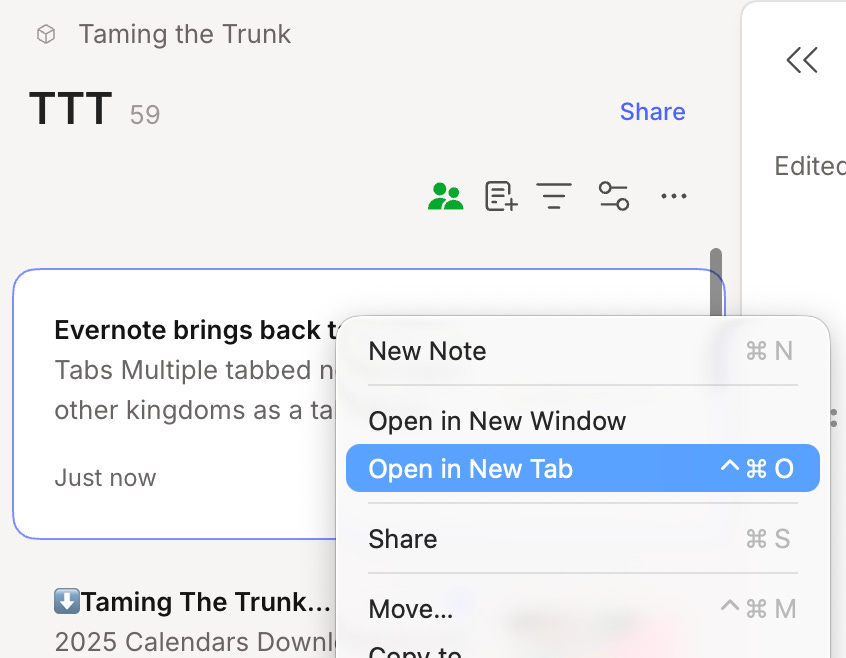
You’ll then have a new tab open with that note.
There’s also a plus button to the right of all your tabs.

When you click this, a new tab is opened to your default in Settings -> Preferences -> Application -> When opening a new tab.
You can set this to start on the home page, all notes or all notebooks.
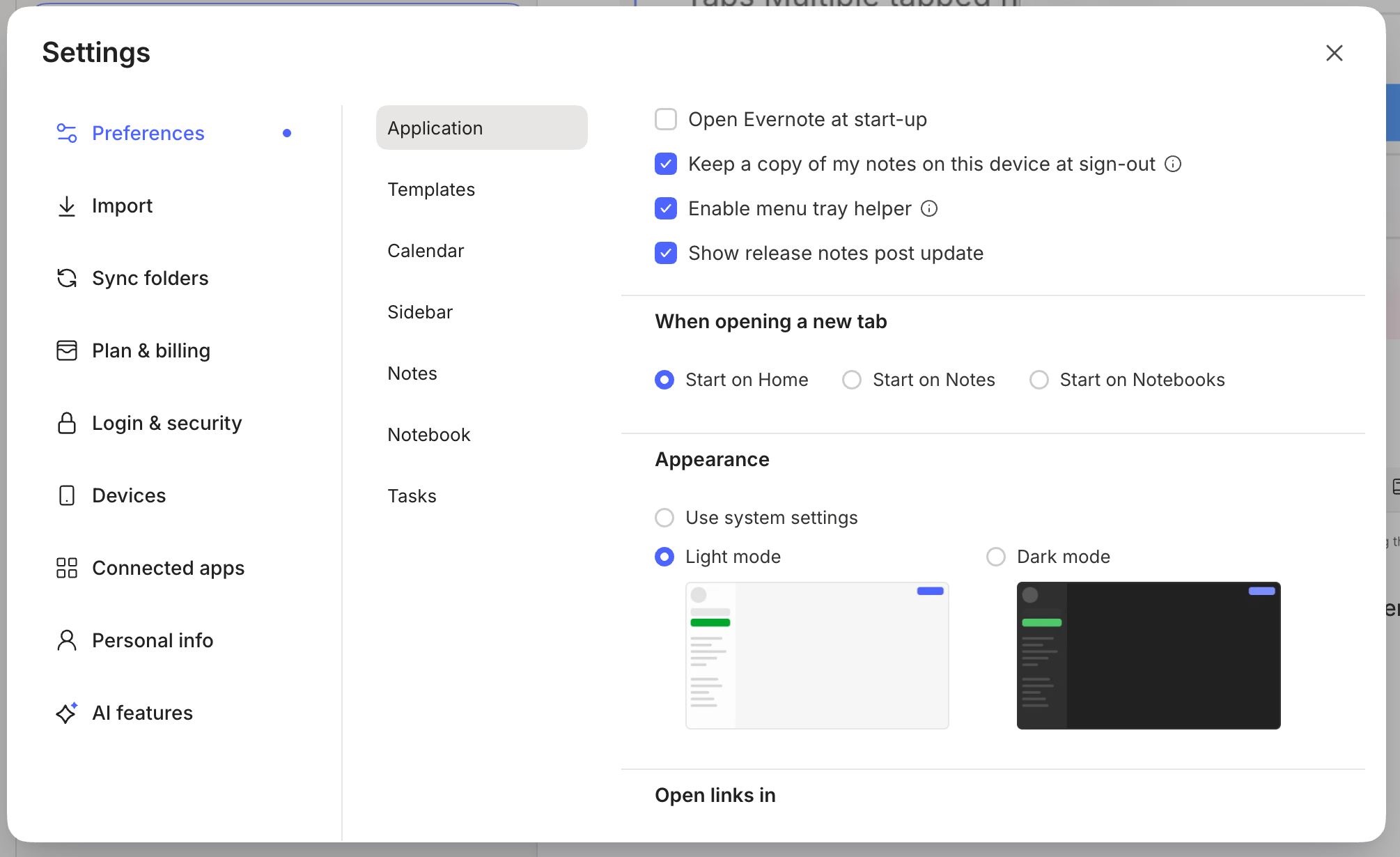
When you click on a new tab, the note is opened on its own or with its note list.
If the note opens on its own in a window and you want to see the note list for the notebook it’s in then just click the notebook name in the breadcrumbs at the top of the note.

I know a lot of folk who have multiple notes open in separate windows, so this will be a great improvement and a slightly easier workflow.
If you end up opening lots of tabs, because I know you will, the size of the tab will shrink so you won’t be able to see the name of the note. Just hover over the tab and a tooltip gives you the name.

Reorder your tabs by dragging
You’ll probably find that as the day goes by and you open more and more tabs, they won’t be in the order you want them, so grab hold of them with your mouse and drag to reorder.
I’ve found this really useful. Just kind of changing priority of the notes by reordering.
When I’m working on a specific project, I now open all the notes I may need and reorder them by priority or usefulness.
Open other Evernote sections in a tab
We’re not just restricted to notes.
We can open the following views in a tab:
Tasks
Home Page
All notes
Calendar
Templates Notebook
Notebooks
The only one missing from the list is Spaces. I’d love the chance to open a space in a tab.
Being able to open Tasks in a new tab has been very helpful. During the day, I have Tasks on the far left of my tab bar so I can switch to it really quickly. I then open and close other tabs when I need to.
I’ve also found having Calendar open in a new tab useful for when I’m adding lots of meetings in one go, I can switch between notes and calendar really quickly now.
There’s a tab indicator when recording
Another little feature that’s very useful is being able to spot if you’ve got a recording going on and which tab/note it’s in.

When you’re recording yourself or a meeting, there’s a little pulsing record dot to the left of the tab that’s recording.
This is helpful.
For one, it reminds you there’s a recording going on so you don’t forget and if you have multiple tabs open at any one time, you can see which one has the recording.
My new little system for meetings is to now open up all the notes I might need to refer to during the meeting in tabs and then kick off the recording in the main meeting note.
I can browse around the different tabs, take manual notes and whatnot, and the main meeting note just carries on recording.
How would you like to see tabs improve?
I’d love to see pinned tabs.
Maybe coloured tabs?
I also have this wild idea of being able to drag some content from a note up to a tab, have that tab open in a different note and be able to drop the content where I want. Kind of drag and drop between notes.
Have you tried tabs yet? What do you think? Leave me a comment
Have a great weekend
All the best
Jon
Thanks Jon. This will be a major selling feature for Evernote.
An alternative existing approach is to add the notes you want to work with to a "Now" tag and put a saved search to the Now tag in your shortcuts. Unlike tabs, this approach allows you to:
1) See at a glance the full title, location, and tags of each note in your Now workspace;
2) Search only the notes in your Now workspace;
3) Have different workspaces for different projects or times of day (by having multiple tags); and
4) Quickly restore a workspace when starting anew (and without having to recall what notes to include).
This approach is limited, of course, to just notes, so I will probably be using the new tabs mostly for different task views and when I need a few notes open for a short time.
Good news; thanks. I just upgraded to 11.9.1 (Mac), which you say is the most current version , but still no tabs.