


A huge thank you to all paid subscribers and many thanks also to those who bought me a coffee. Taming the Trunk is 100% reader supported, no ads or commission links and your support is really appreciated.
Newsletter housekeeping: The latest version for PC & Mac is 11.37.5. You can grab it from the download page. Latest mobile version is 11.37.4.
Evernote are working on tags!
Not everyone uses tags, but for the ones who do, tagging is absolutely critical to the way they manage their notes in Evernote.
Go on, tell me how many tags you have?
They’re about to get an upgrade.
Yesterday the team shared a little video of a prototype they’re working on.
It’s only 30 seconds long, but it gives us a really good look at what they’re working on and I want to go through the video, explain what I’m seeing and make sure you let me know what you think.
Note: This is a prototype and not the final version, so things may change.
A full-page tag kingdom
This is something folks have been asking about for quite a long time and we’re finally getting a full-page tag kingdom instead of the little sidebar thingy which is awkward to navigate.
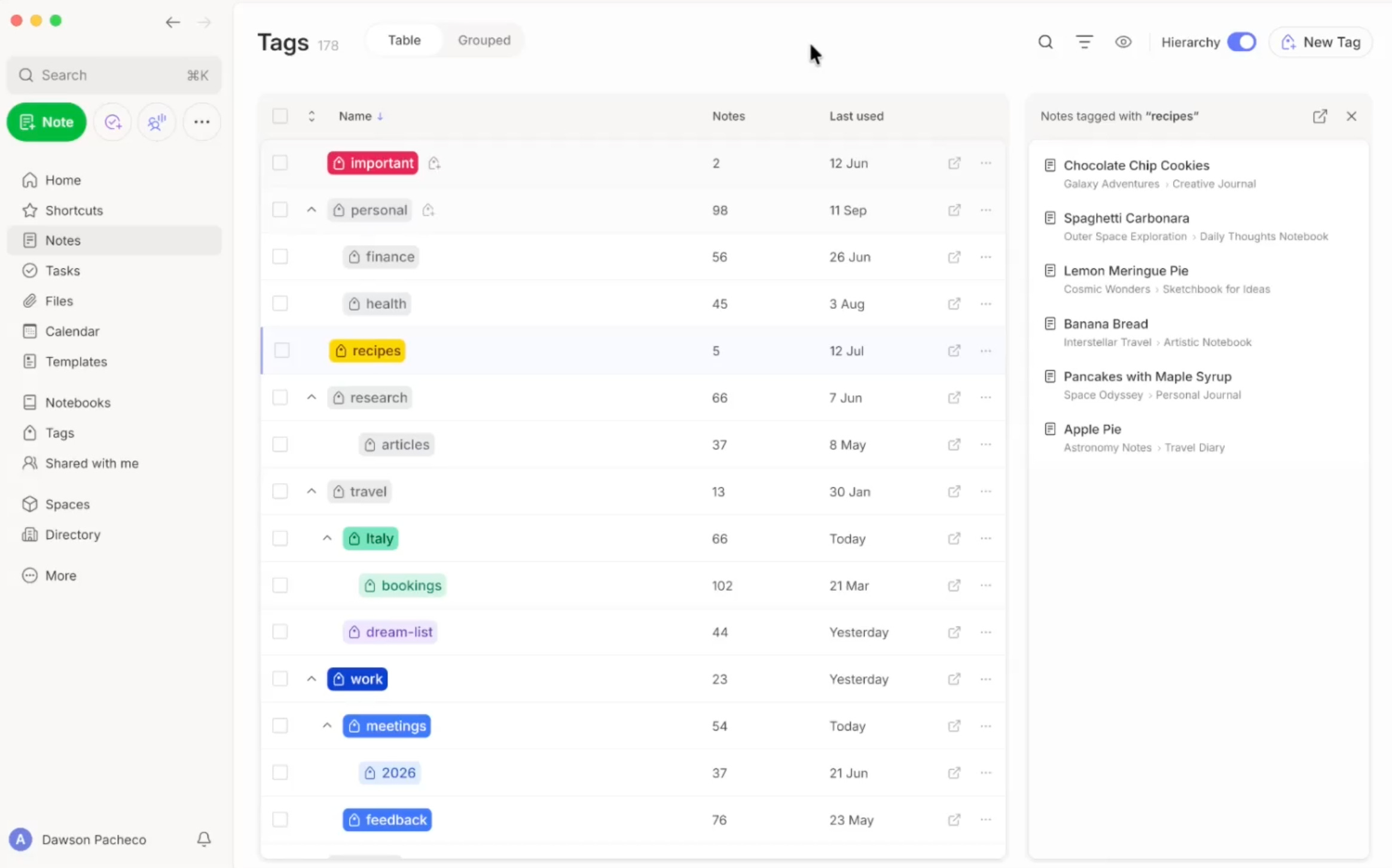
Notice at the top right of the page there is a toggle for Hierarchy, from the looks of it when the toggle is on you’ll see all the tags nested underneath their parents.
If you switch the toggle off you see all your tags.
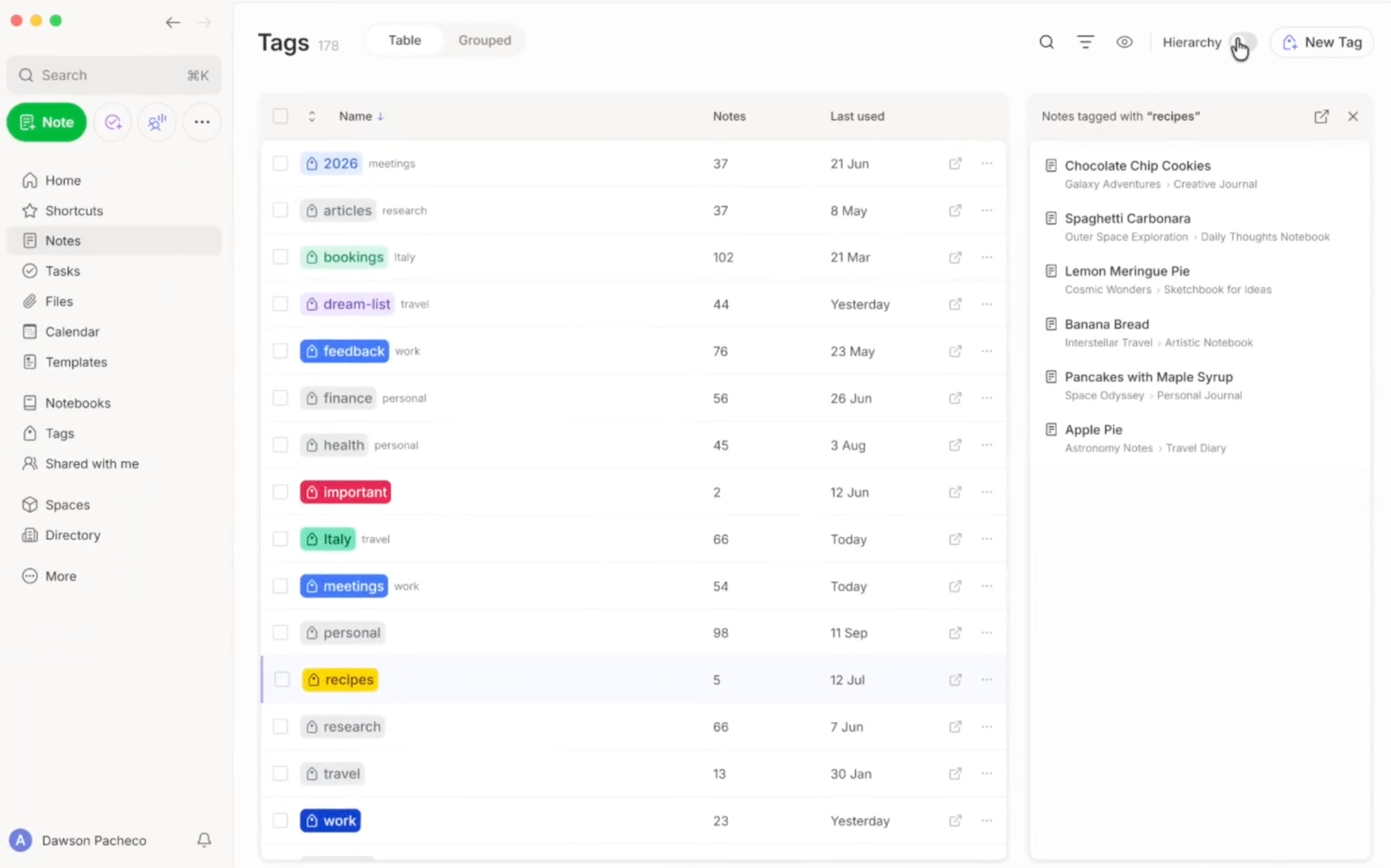
From what I can tell you can also see the parent tag in small text to the right of each tag.
One of the other icons across the top is for search, I presume this will work like it does in tasks where you start typing and the tags are filtered.
There also looks to be icons for some sort of filtering and also an eye icon, maybe something to do with hiding or viewing, not sure, we’ll have to hang on until its finished.
Something else really interesting about this screen is the right-hand sidebar.
Notice how the recipes tag is highlighted on the screen and the notes tagged recipes appear in the right-hand sidebar. There’s also a little open icon at the top of the sidebar, so I’m assuming this will open the notes in a normal note list view.
I really hope we’ll be able to select multiple tags from the main pane and have the notes tagged with them appear in the sidebar. This would make it a lot easier to find notes tagged in very specific ways.
Let me know what you think in the comments.
Coloured tags are coming
This used to be a feature of old Evernote and one of the few things I liked about it.
Coloured tags went away when version 10 came out. They’re finally coming back.
I only tend to use tags for priorities or next actions so just this one little thing will make a big difference to me. The higher the priority the stronger the colour.
From another part of the video we get to see the colour choices.
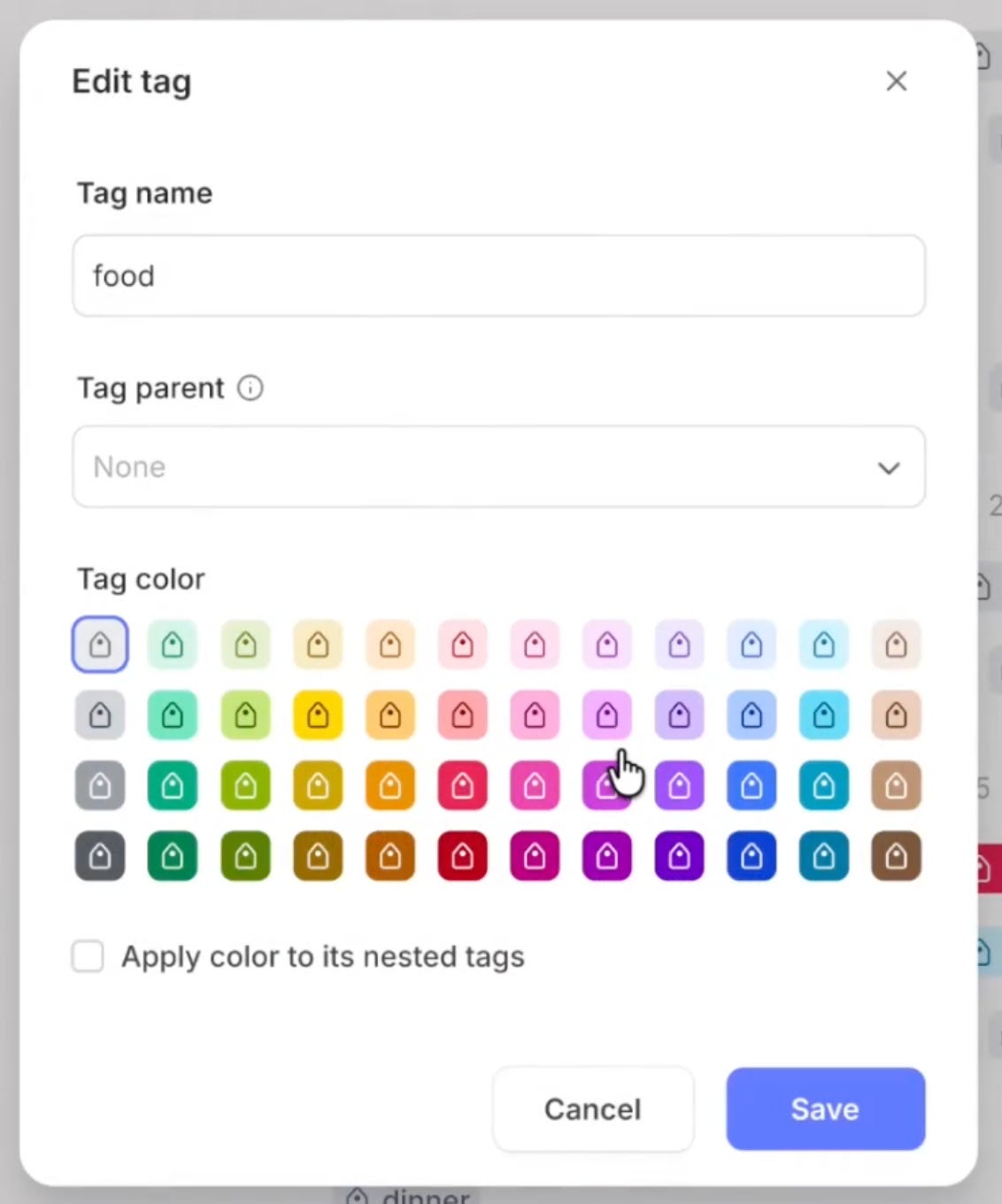
There looks to be a tick box for applying the colour to all the nested tags, so I presume if you’re changing the colour of a parent you can change its children colour as well.
I’m pretty sure this will please many folk so let me know in the comments if you’re happy.
There’s a grouped view
Directly at the top of the new tag kingdom I can see buttons for Table and Grouped views.
Table view is what you see above.
Grouped view looks a little bit like this.
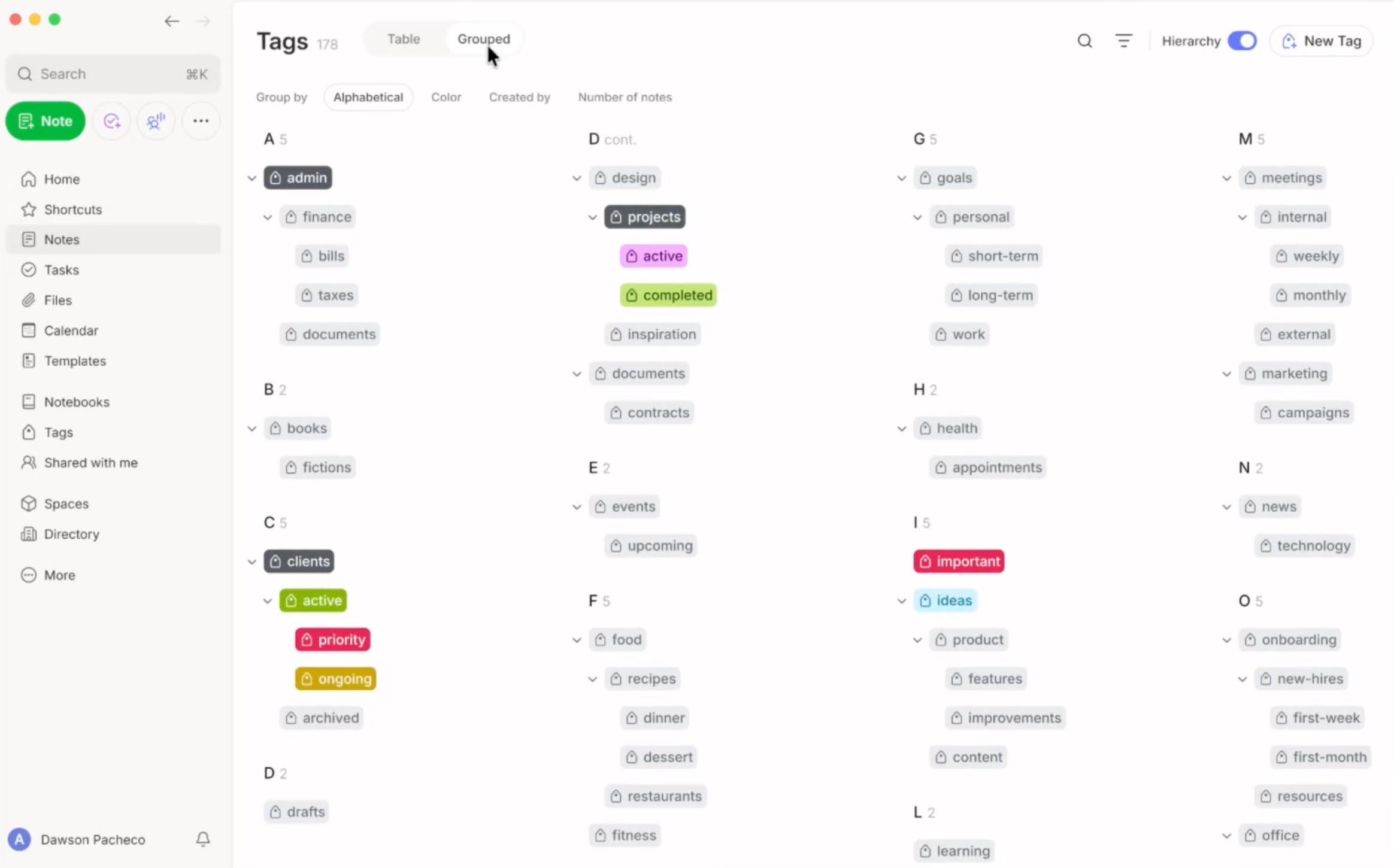
The screen looks to default the group to A - Z, but there’s also options for grouping by colour, created by and number of notes.
It would be useful to be able to swap the sorting order for these, maybe that’s what’s behind the little icon next to search.
Is there anything you’d like to see here? Let me know in the comments.
Managing tags
When you hover over a tag you can see a three-dot menu which brings up some more options.
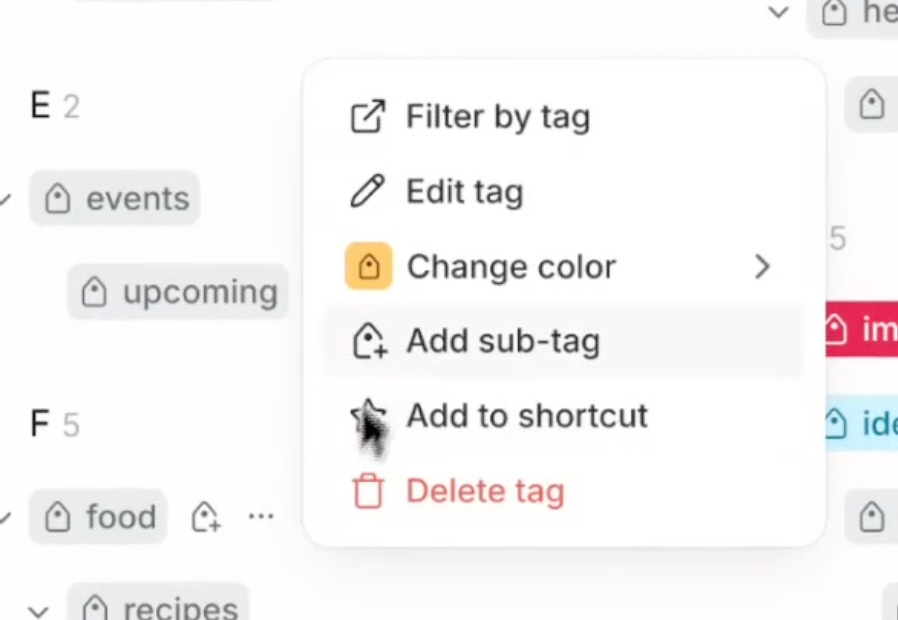
It looks like when you hover a parent tag there’s a little new tag icon appears which presumably adds a child tag.
Filter by tag with a little open icon may mean that it opens a note list with all the tagged notes.
We can edit the tag, change the colour, add a sub-tag, add the tag to shortcuts or delete the tag.
Take a look at the screenshot with all the colours to see the edit tag window. You can change the name, colour and move it to another parent if needed.
This is pretty cool. It’s nice to see tags being worked on.
Don’t forget what you see above is a prototype and not the final version. It may look very different and more polished when it goes live.
What would you like to see? How would you like to see tags improved? Let me know in the comments.
And finally . . .
Evernote has released a little video on the new table editing features.
That’s it.
Have a great weekend
All the best
Jon
This is great. Like you I cleaned up my tags and just had them for managing status (todo, active, waiting etc). I was tempted to put all my web clippings into a single notebook and assign tags. I like to keep my own notes separate as they're the ones I really care about and want to back up. Look forward to them releasing this
As someone who uses tags a lot for one specific project, colour-coding and a better tag management screen are very welcome additions.
Be interesting to see if they make it possible to automatically add tags when a sub-tag is added rather than just using the hierarchy as a way to keep things tidy.