


A huge thank you to Vincent who became a paid subscriber over the last week and many thanks also to those who bought me a coffee. Taming the Trunk is 100% reader supported, no ads or commission links and your support is really appreciated.
Newsletter housekeeping: The latest version for PC & Mac is 11.7.2. You can grab it from the download page. Latest mobile version is 11.4.3.
Over the last couple of weeks I’ve been reorganising how I collect and store receipts and bills in Evernote.
I think I had kind of outgrown my old system, which was to have a Receipts notebook for every year and then pile all my receipts and bills into it using a naming convention.
I was starting to have a few issues finding and grouping receipts and bills, especially for work. Even the AI Assistant didn’t really help much and I didn’t want to start using tags as that just makes everything more complicated.
Another reason why I’ve changed my system slightly is that when the price and plan changes happened last November, the Advanced plan ended up with unlimited (fair usage) notebooks. Before, we were limited to 2000 on the Professional plan.
With my new system, I could see myself getting close to the 2000 limit at some point, which may then need another change. With unlimited notebooks, I don’t need to worry.
So how’s it working?
I’ve decided to keep my Stack called Receipts but structure the notebooks in a different way.
I still have Receipt notebooks for each year and these hold one-off bills and invoices, just random stuff I want to keep.
I’ve then created notebooks for the important areas, which are mainly bills, invoices and receipts from recurring services or companies.
Water
Gas
Electric
Phone
Uber
Domains and Hosting
Google
Zoho
The list of notebooks is much longer than this, you’d be scrolling a lot.
These are the important areas where I may need to collate receipts for my accountant, a lot are home and business expenses.
Another change is that I don’t have a different notebook for each year. All of my Electric Bills go in the Electric notebook.
I also stick to my strict naming convention.
WHO WHAT WHEN
So my notes titles still look the same.
Eon Electric Bill February 2026
The difference is that instead of ending up in a Receipts 2026 notebook, it now goes in the Electric notebook.
I use Uber a lot. I book my train tickets via the app, book taxis a lot and I subscribe to Uber one to get the credits that go towards future travel.
I have a LOT of Uber bills and now they are all in an Uber notebook.
Another example is with my phone.
I have two sims from different companies. One for personal and another for business.
I also buy a few apps, subscribe to Apple News and Music so anything related to my phone now goes in my Phone notebook.
Capturing receipts
Regarding getting bills into Evernote, I still email things in and I’ve been going back as far as 2006 to make sure I have everything. A bit tedious but worth it in the long run.
The other day I emailed in over 150 receipts into Evernote and everyone got there. It works a treat.
For scanning paper receipts and bills, I have changed this a little. I’m using the Scannable app from Evernote instead of the built in scanner.
The main reason is that it creates PDFs of the scan instead of just images. I prefer a PDF.
Scannable is made by Evernote and if you have a paid Evernote plan then you can send your scans directly into a notebook for free.
The app is only available on iPhones, not Android which is a shame. Anyone non-Apple will need to use the built-in scanner, which is pretty good. I used it for years with my Android phone.
Searching for receipts
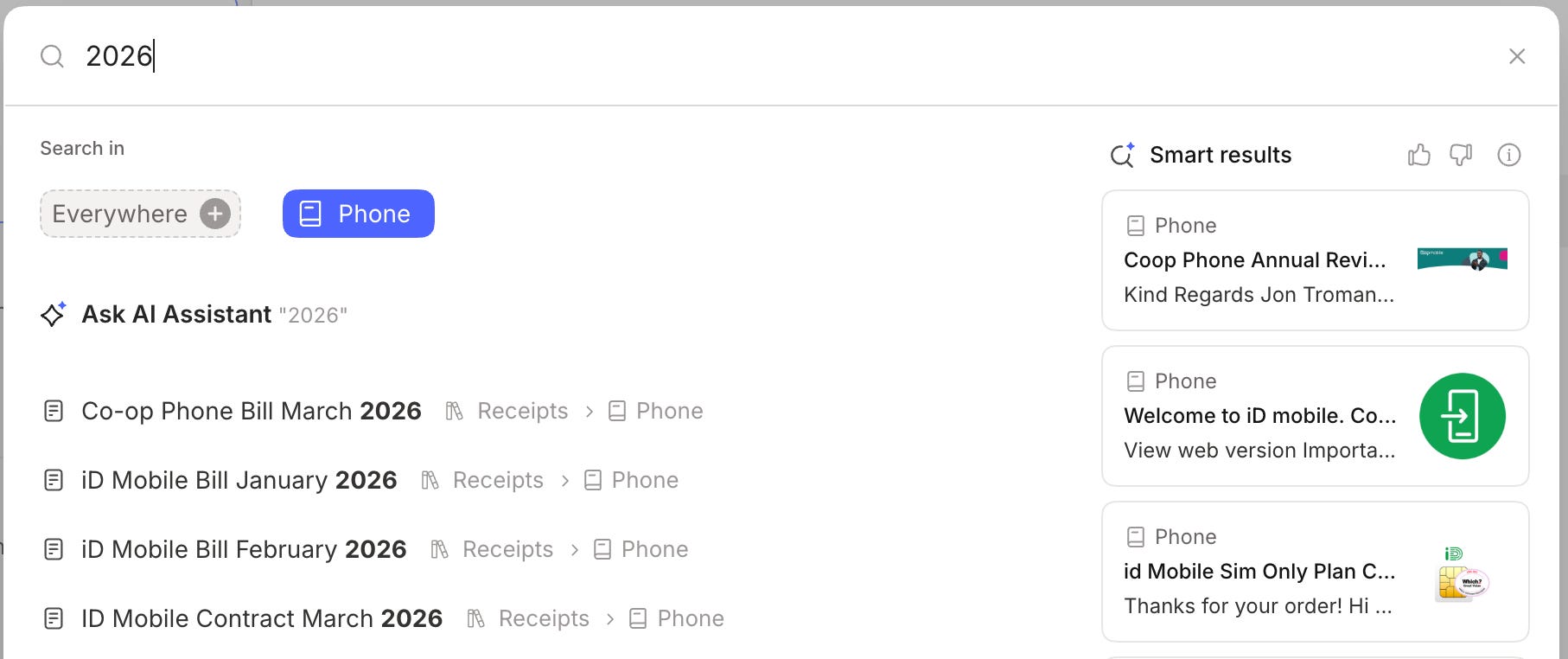
On the retrieval side of things, I can now direct my searches and the AI Assistant at a specific notebook and find the information I want much easier. Much less noise in search and more accurate AI results.
In this example, I’ve just searched for 2026 in my Phone notebook and I get all my phone bills for this year.
So that’s how I’m doing it.
I’ve still got quite a bit to do re-organising things and it will take a few months to get it all in order, but once it’s sorted, I’ll have a historic collection of important receipts going back 20 years and going forward, finding and collating bills will be much easier.
One other thing to mention is that I’m not a hoarder so not every receipt for everything goes into a notebook, only the important ones. For example the Amazon receipt for a bulk pack of bamboo toilet paper isn’t going into Evernote, I don’t care about that. But the receipt for my ear buds would just in case they go wrong.
How do you manage receipts? Do you change your system from time to time? Mix things up a bit? Let me know in the comments.
Have a great weekend
All the best
Jon
I only use Evernote to store receipts for purchases with a guarantee. I just email it to Evernote and tag it, imaginatively enough, with “receipt” and put it into my Main folder.
At the same time, I try to remember to store the pdf of the instruction manual too.
My Evernote-based filing system is, perhaps, a tad simpler.
I have a notebook for each type of document, e.g. Bills, Tax receipts, Correspondence.
I use tags to add the topic or vendor/supplier/store, sometimes a year to group notes together, and sometimes a major brand name of an item I bought.
For bills, the note title follows a standard naming convention: YYYYMMDD Store InvoiceNumber
And, finally, I set the note creation date to match the bill/receipt/correspondence date.
Examples:
20260201 Children’s Hospital Foundation 2891063
tags: 2026 Taxes, Children’s Hospital Foundation
notebook: Tax Receipts
20140503 City Power
tags: City Power
notebook: Bills - Utilities
20200912 Costco 26401783520209121743
tags: Apple, Costco
notebook: Bills