

A huge thank you to all paid subscribers and many thanks to Tom, Anon, Bridget & Sean who bought me a coffee. Taming the Trunk is 100% reader supported, no ads or commission links and your support is really appreciated.
Newsletter housekeeping: The latest version for PC & Mac is 10.171.1 (not 11 yet!). You can grab it from the download page. Latest mobile version is 10.167.1.
The new AI Meeting Notes feature that was launched a few months ago is now burnt into my muscle memory.
I’m a bit slow. It can take a while for me to build a habit, but last Monday I had a meeting and found myself automatically going for the meeting recorder, success!
I’ve made it a goal to record all my meetings, transcribe them and get them summarised so I can have a proper archive of exactly what was said. It’s already saved a few emails to folk when I forgot a specific bit of information. I used the new AI Assistant to look at the transcript and find the information I needed. Quick and helpful.
To activate a recording, my muscle memory is going to the microphone icon the the notes formatting bar. You can also use a ‘/’ command or use the insert menu. The microphone seems to be the quickest for me.

I don’t always transcribe and summarise right away, but the audio is in the meeting note and the option is always there.
It’s a great feature and very popular across the board, something I use quite a bit and the deep dive I did some time ago has always been one of the most read articles here on Taming the Trunk.
There still needs to be improvements and I’ll talk about those after we’ve looked at the recent updates.
Set a default language for the transcription
This is huge!
There’s been an issue with the transcription feature transcribing into the wrong language, specifically Welsh!
Now its’s not been widespread and I’ve never had this happen myself but I’ve spoken to a large handful of folk who are not in Wales, don’t speak Welsh but get transcriptions in Welsh.
Mae angen i mi ddysgu Cymraeg.
We now have a solution.
You can set the default transcription language in the dropdown menu of the Transcribe button.
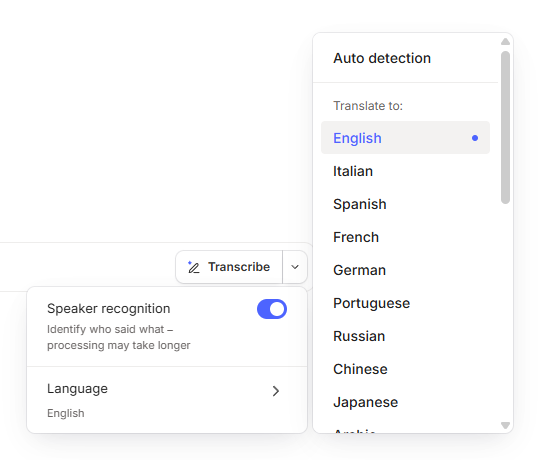
Evernote will also remember this setting next time you come to transcribe something.
Have you seen Welsh transcriptions? Try this and see if the problem is fixed and leave me a comment.
Delete the summary, transcription, either or both
We now also have a bit more control over removing the transcription or the summary, or both.
When you’ve transcribed and summarised, you can hit the three-dot menu at the top right of the transcription block and there’s an option to delete.
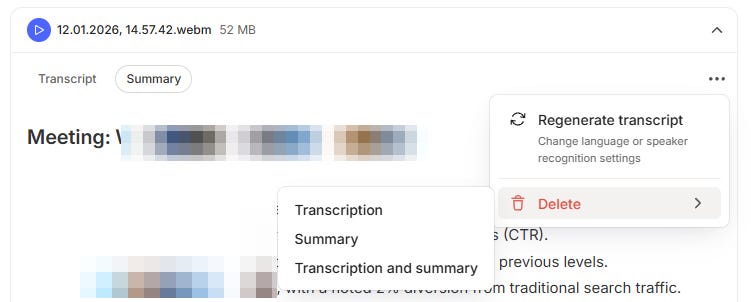
You also get the chance to regenerate the transcription with or without speaker recognition.
Start a recording from the calendar view
Another very small improvement has been a new button in the main calendar view that will kick off a recording.

Useful?
How to improve AI Meeting notes even more
There are three things that I think would round off the feature very nicely.
The first is increasing the transcription limits.
Right now, you can transcribe up to 1 hour or 100MB.
I’d like to see this increased to the maximum size of the note, which is 200MB or give us an hour and a half. Many of my meetings are set at 1 hour but they always last longer.
The second thing I’d love to see is proper mobile support.
I would really like to open Evernote, start the recorder and just stick my phone in the middle of the table and record the meeting. I don’t want it to stop or my screen go dark, I just want the meeting recorded.
I’d also like to be able to move around my notes when recording like you can with the desktop.
Finally I’d love the ability to be able to record phone calls using Evernote on my mobile.
All the call centre calls about insurance, electric, gas etc could be recorded and summarised.
That’s my wish list.
How would you like to see AI Meeting notes develop? Do you use it? Leave me a comment below.
Have a great weekend
All the best
Jon
I started recording meetings once the option became available. Most of the time I am somewhere I am using my iPhone. I set the phone down, the screen goes dark. Sometimes the recording continues and other times, there is no recording. I haven’t figured out why. I’ve had too many situations where I thought I was recording and nothing was there. Maybe you know why this is happening.
I now use Otter (paid version). Otter does give me 90 minutes. Otter automatically summarizes the meeting which is handy. Most of the time, I copy the transcript into ChatGPT and ask it to organize it. This is very nice because I can ask it to organize it by a particular topic, etc. I then copy what I need into Evernote.
Has the AI Assistant been released? I thought it would be made available with EN version 11, which appears to be vaporware so far!