

A huge thank you to JE, Ray, Alastair, The Old Grey Thinker and LO who all became paid subscribers over the last week. It’s much appreciated. Also many thanks to those who bought me a coffee. Taming the Trunk is 100% reader supported, no ads or commission links and your support is really appreciated.
Newsletter housekeeping: The latest version for PC & Mac is 11.29.2. You can grab it from the download page. Latest mobile version is 11.28.3.
Folks have been wanting this for years... I’ve been wanting it, you may have been wanting it!
We can now print PDFs and image attachments without opening them.
Before, if you wanted to print a PDF attachment you’d have to open the PDF first and then print it.
Now, behind the three-dot menu, you’ll find a Print option.
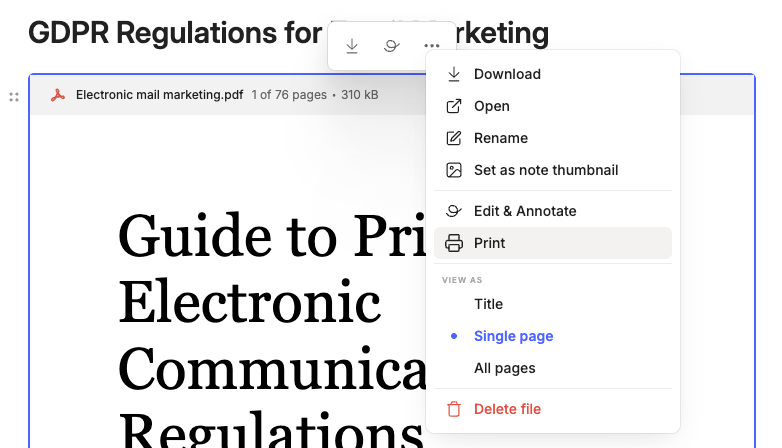
You don’t need to open the PDF.
I must admit, not the greatest new feature ever, but it’s a little thing that will make workflows just a little bit easier.
You can also print text files and images.
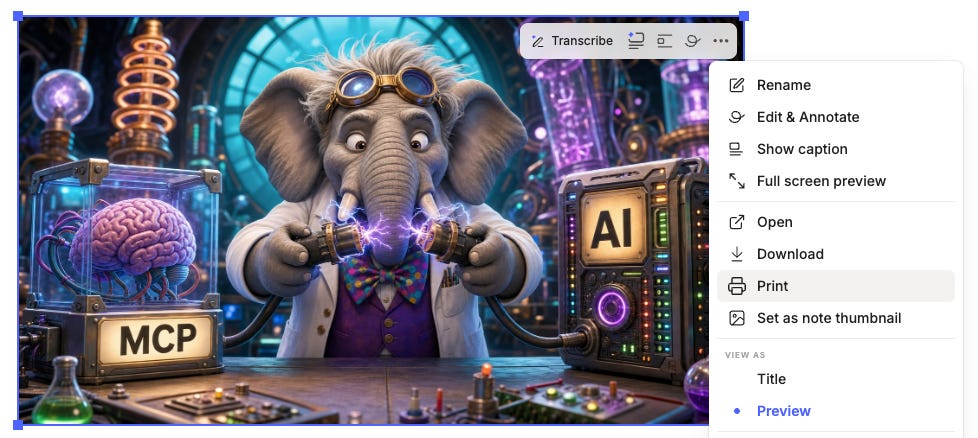
Limitations are that it doesn’t print complicated attachments like Word documents, so you’ll have to open them as normal and then print.
This is a nice little improvement. Let me know what you think in the comments.
I need to share something quite personal with you.
It’s a little embarrassing.
I’ve started talking to the Evernote AI Assistant.
Thankfully, I’m not sharing my deep dark secrets like how I enjoy watching reruns of Star Trek Deep Space Nine!
No, I’m just starting to dictate the changes I want to make to my notes.
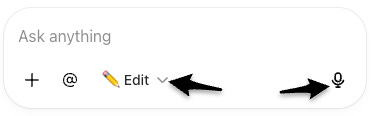
Edit mode arrived a couple of weeks ago and has been a bit of a game changer for me. It’s saved me loads of time faffing and fiddling with my notes.
Yesterday, I spoke these words:
Move the selected names, email addresses and company names into the table in the note keeping them in the correct columns.
It did it. I would normally have to copy pasta them all one by one.
When I was writing a report I spoke:
Identify any important information the client really needs to know and turn it into a call-out.
It did this and changed the icon in the call-out to an ‘i’ emoji.
I find all of this amazing and it’s changing the way I use a computer.
No longer is a computer or an application a ‘technical’ thing where you use keywords to search for things or strict naming conventions. I don’t have to click icons in a certain order to get what I want.
I just say things in natural language and it happens.
This is also working for me outside of Evernote.
In ChatGPT I now say:
Mark invoice 3801 as paid by bank transfer.
I would normally have to load my invoice software, click on invoices, click on invoice 3801, click add a payment, select bank transfer and save.
I now just say what I want and the AI does it.
I still create. I still think. In Evernote, the arranging of content in a note and formatting is now done quickly by AI without me having to fuss and fiddle.
I want to create. I don’t want to spend my time formatting and fiddling and fussing and organising. I want to create notes and content.
Just waiting for it to wash the car!
I’d love to hear your thoughts on this. Is AI changing the way you use a computer?
Are you using voice input with the AI Assistant or other tools? How do you find it? Let me know in the comments.
You can transcribe and regenerate transcriptions using the AI Assistant
A small update to the AI assistant this week.
You can now kick off a transcriptions and regenerate a transcription from the AI Assistant.
I’m not 100% sure if this is useful. It’s pretty easy and fast to hit the three-dot menu and bring up the regeneration screen.
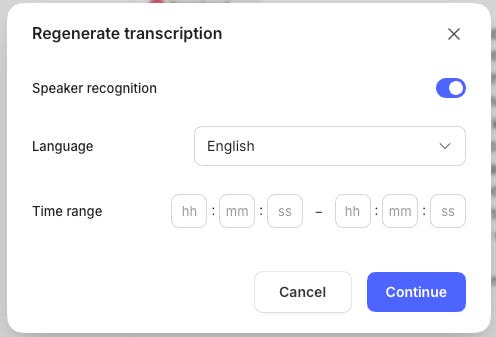
Maybe the thinking is that you can build transcription instructions into a saved AI Prompt that runs the AI on older, non-transcribed files.
I’m pretty sure there’s some good use cases.
And finally...
The official July recap video has been released. These are always worth a watch.
And finally, finally…
Bending Spoons, the company the owns Evernote has had their first earnings call since their IPO.
The headline is:
Bending Spoons reported strong Q2 2026 growth, continued an acquisition-led expansion strategy and positioned AI, operational capacity and financing as the foundations for further scale.
I’ve put together a shared Evernote note which holds a summary of the earnings call, specific Evernote related information and a transcript of the whole call.
Thanks to the AI Assistant for summarising this.
Have a great weekend
All the best
Jon
Thanks, using Chat GPT very comprehensively as well as Evernote AI. Regarding DS9, have you looked at The Orville?
Your note summarizing the earnings call was informative and concise. Thanks.