


A huge thank you to Albert, Doug, Michael, Eric, LB, Patrick, Geoffrey and Alasdair who became paid subscribers over the last week and many thanks to Bill who bought me a coffee. Taming the Trunk is 100% reader supported, no ads or commission links and your support is really appreciated.
Newsletter housekeeping: The latest version for PC & Mac is 10.164.2 (not 11 yet!). You can grab it from the download page. Latest mobile version is 10.164.2.
There are three big new features coming to version 11 of Evernote and I’ve already done a deep dive on the AI Assistant and AI Meeting Notes, the last one is Semantic Search.
So here we go.
What is Semantic Search?
Semantic search uses the meaning and context of words, rather than just word matching to find relevant information in your notes.
This is currently rolling out slowly to folks on the Advanced and Enterprise plan and Evernote are currently re-indexing or ‘embedding’ our notes ready for the launch of version 11. I’ll explain what embedding is later on.
In old school standard search, which is still available, Evernote matches the words you type into the search box with words in your notes.
When those words appear in the note it displays them in the search results.
This means you need to know what you’re looking for.
With semantic search you’ll be able to find notes that are related to the words you search for but may not contain those specific search words.
This means you can find the notes you want when you don’t know exactly what to search for.
For example. If you search for ‘Apple Pie’, the standard search will return notes with Apple and Pie in them. Semantic search may find you notes for Blackberry Pie or Fruit Deserts as these words are related.
Here’s another example. I do a lot of backpacking and walking but I don’t use the word ‘Hiking’ in any of my notes.
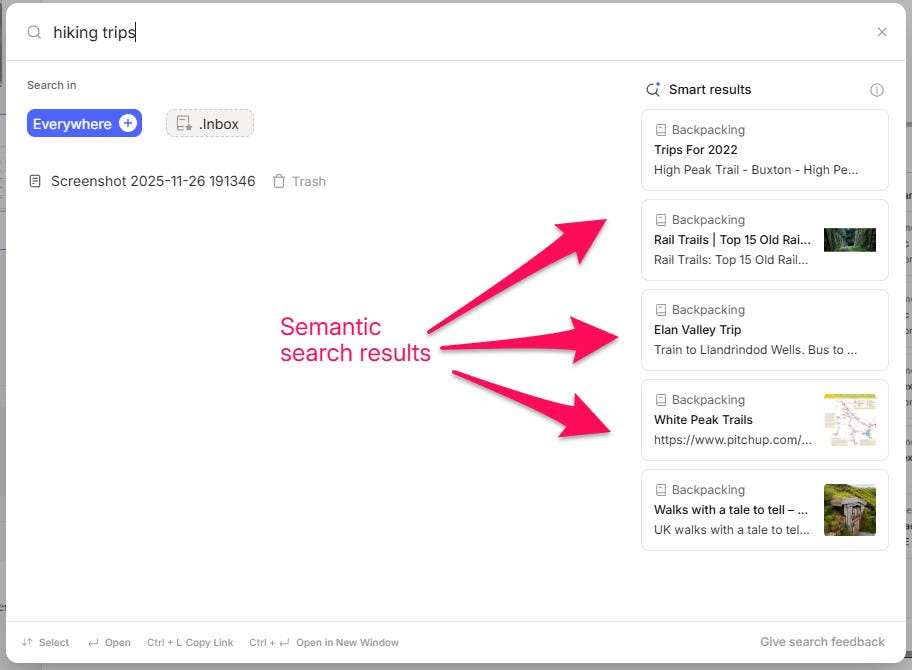
This is a search for “hiking trips”.
The standard search results are on the left using the normal Evernote search we know.
Its just found one result which contains the screen shot above, its found the words ‘hiking trips’ in the image, but there are no other notes as I don’t use the word ‘hiking’.
On the right hand side you can see the Semantic Search results which are called ‘Smart results’.
None of these notes include the word ‘hiking’ but they do include words like ‘walking’ and ‘backpacking’ which are closely related to ‘hiking’ which is why they show.
One of the other features of Semantic search is to give you an answer to a specific question, a little bit like the old AI powered search, but better.
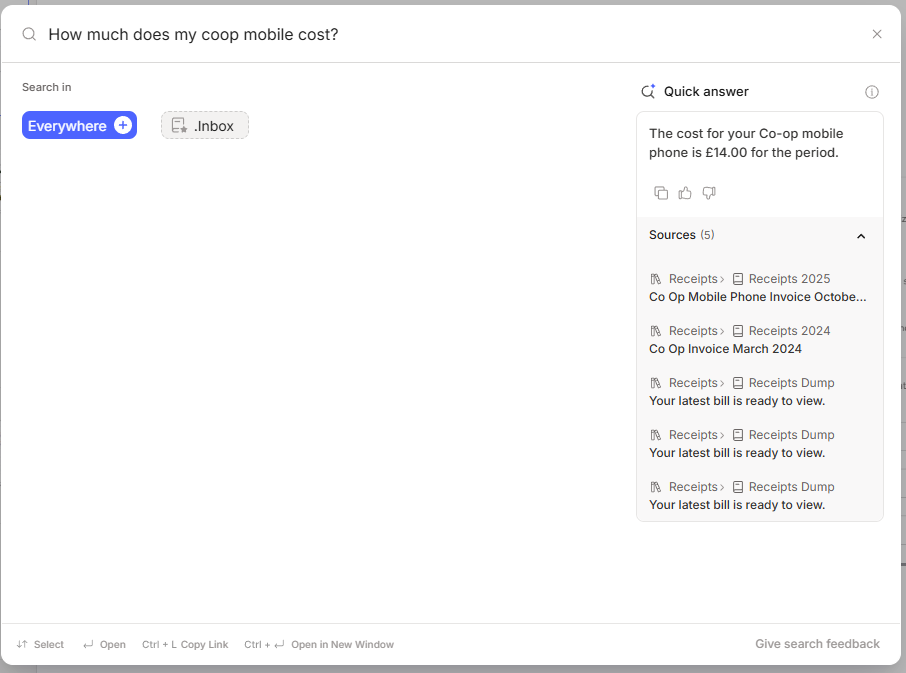
If Evernote notices a question inside the search box it may activate the ‘Quick answer’ on the right hand side. You’ll get the answer to the question and also relevant notes.
It found how much I pay for my Coop SIM free plan on my phone.
To get the quick answer working use words like ‘who’, ‘what’, ‘when’, ‘how’ or add a question mark at the end.
Semantic Search AI Privacy
This new feature using Evernotes own Ai system on their own servers and no data is used to train the AI and no information gets sent to a third party.
Here’s what Evernote say about Semantic Search on their AI page:
Semantic Search uses Evernote’s internal AI models. To help you find the most relevant content, Evernote performs an advanced form of note indexing, which occurs securely on Evernote’s servers and no content is shared externally.
Evernote are re-indexing or Embedding our notes
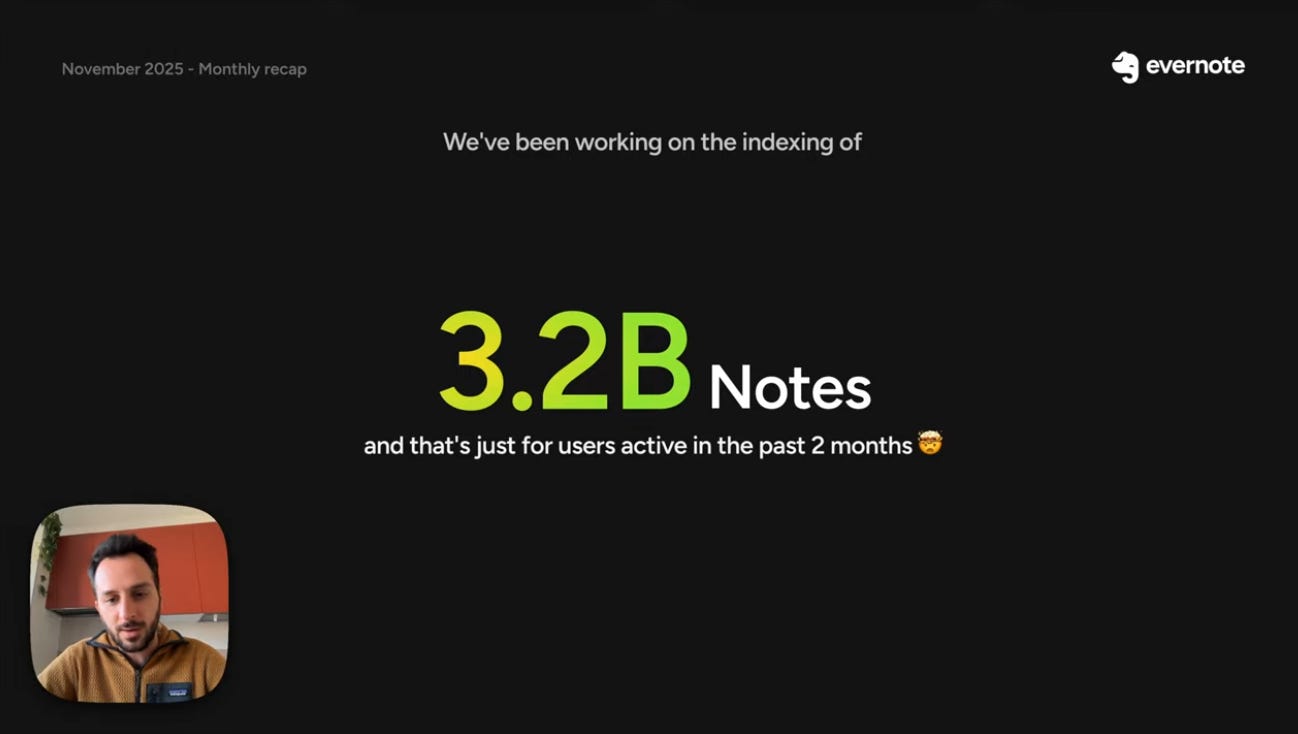
In the latest official recap video (bottom of this article) the product lead of Evernote, Federico, mentions that they are currently re-indexing or ‘embedding’ our notes so that semantic search can be rolled out to everyone.
They are working on processing 3.2 billion notes!
What does embedding mean?
So, I’ve done some research and I think I understand the basics of how embedding works but I’m not an expert. This just kind of explains how the process works but I would imagine its much more complicated than this in reality.
The process of embedding is giving a number to each word in your notes. I would imagine stop words like ‘the’, ‘is’, ‘at’, ‘which’ and ‘on’ are ignored.
Similar words have numbers that are close together like ‘car’, ‘vehicle’, ‘automobile’.
Words like ‘car’ and ‘banana’ would have numbers that are far apart as they are not related.
The numbers given to each words are called embeddings.
So using my ‘Hiking’ search example further up the page, the words ‘hiking’, ‘backpacking’ and ‘walking’ would be given numbers close together.
When I search for ‘hiking trips’ the sematic search results bring up ‘backpacking’ and ‘walking’ because the numbers a close together.
In old school standard search the words ‘hiking’ and ‘trips’ would need to be in the note. Not so with semantic search.
What I also understand is that embeddings also looks at the words surrounding each word to understand its meaning.
For example, ‘We have a fine day’ and ‘She has fine hair’ both use the word ‘fine’ but with a different meaning.
Embeddings help Evernote understand that ‘fine’ in each sentence has a different meaning based on the neighboring words.
All of this process is being done on Evernotes servers with no data heading to third party AI’s. I don’t know for sure, but I would imagine the AI is being used to decide how words are related to each other.
Are Evernote standard and advanced search being removed?
Short answer, no.
When you open the search box and search for something the results on the left hand side are the normal search results and this includes advanced searches. Everything should work pretty much the same as it always has.
Semantic search and the quick answer will appear on the right hand side of the search box.
My thoughts
I think for some folk, semantic search will be more useful than the AI Assistant, especially if you don’t spend a lot of time organising. You’re going to be able to surface related notes.
I think it will also mean that over time we’ll be learning to not organise quite as much as we do now.
For example, I won’t need to worry if I call something a ‘bill’ or ‘receipt’ or ‘invoice’ as the search will see these words as closely related and surface them.
You can find the official Help and Learning article about Semantic Search here.
Let me know what you think of Semantic Search in the comments. Will this change the way or search or organise? Have you got it yet?
And finally...
The official Evernote November recap video is out and this month talks about the work being done to release version 11 and show off some of the new features.
Have a great weekend
All the best
Jon
BTW Thanks for the good description of semantic search.
Jon - I saw the value in semantic search years ago when working for a U.S. government client. Since retiring, I’ve written what has become a rich set of articles on the history of my corner of the Lowcountry of South Carolina. My research has often been captured in Evernote but not my writing or the published articles. Semantic search will encourage me to move the published articles into Evernote so I can explored the gaps in my articles and reveal ideas for new articles. If this new search works well, I predict it will be a huge magnet for increased use of Evernote in new and creative ways.