

A huge thank you to all paid subscribers and many thanks also to those who bought me a coffee. Taming the Trunk is 100% reader supported, no ads or commission links and your support is really appreciated.
Newsletter housekeeping: The latest version for PC & Mac is 11.35.6. You can grab it from the download page. Latest mobile version is 11.35.3.
I’ve been converting my notes into Word documents. Why, I hear you cry!
It’s something I’ve been doing for a while as some of my clients want information in Word documents, they don’t like shared links or PDFs for some reason, probably an IT policy thing.
I’ve always hated using Word itself and feel much more comfortable writing in Evernote which I’m doing right now.
So, Evernote can’t export notes as Word documents (would be nice) but if you connect Evernote with a third party AI tool like ChatGPT or Claude then you can, plus you can do whatever formatting you want without faffing around in Word.
ChatGPT now has an official plugin for connecting Evernote and this has made it much easier to install the connection. Claude has a community connector available to install but you can always install the MCP manually.
Here’s a quick refresher on what the MCP is and how to set it up.
My new workflow has been to create a report or proposal in an Evernote note inside the clients notebook.
I might use the Evernote AI Assistant to clean things up, build a a chart and fill tables with data and generally help me get the report ready for the client.
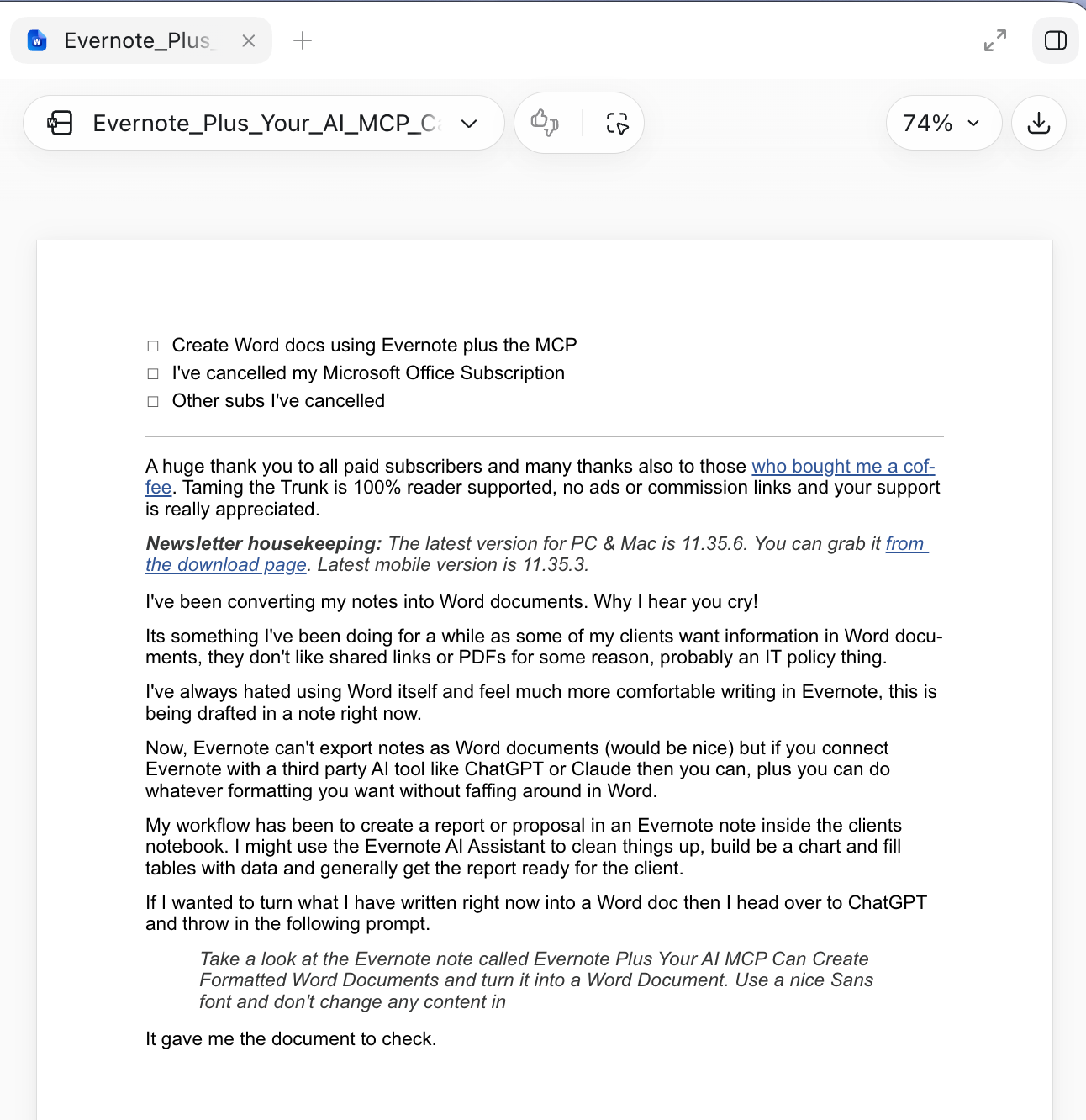
If I want to turn what I have written into a Word doc then I head over to ChatGPT and throw in the following prompt (created for this article I’m writing).
Take a look at the Evernote note called “Evernote Plus Your AI MCP Can Create Formatted Word Documents” and turn it into a Word document. Use a nice Sans font and don’t change any content in the note, just convert into a Word document.
It gave me the document to check and download.
This is useful, but everything gets even more useful when you provide a template or much more detailed instructions to the AI.
I have a standard template with my logo at the top and some footer information. If I give this to ChatGPT and tell it to put the contents of the note into the template, I get something I can send very quickly to a client.
You could use a prompt like this
Use the Word template I’ve attached and add the contents of the Evernote note called “whatever your note is called”. Use a Sans font and don’t change any of the content of the note.
You can also take this to the next level, which I did a few weeks ago.
I’m kind of writing a book that’s been a work in progress for something like 20 years, I will finish it one day.
I write it in Evernote with the draft having its own notebook and each chapter is a different note. The note title is Chapter 1, Chapter 2 etc.
What I did was tell ChatGPT to create a Word document from the notebook and compile it in chapter order. The prompt went a bit like this.
Take a look at the Evernote notebook called NotebookName. This contains a book and each note is a separate chapter. Turn this into a Word Document making sure you are in chapter order. Format it in a nice serif font and make sure to indent each paragraph. Use page numbers in the footer and centre them. Don’t change any of the content.
What you end up with is a nicely formatted book in Word format that you can start editing.
I write all my first drafts in Evernote, be it a client report, article for Taming the Trunk or my very dodgy book. I find Evernote easy to write in and with the MCP I can get whatever file format I want.
Have you tried this? Would you find it useful? Let me know in the comments.
Which brings me to...
I’ve cancelled my Office 365 subscription!
I always moaned about paying this as I only really used PowerPoint for work and Word for reading things. I never use Excel.
When I bought my Mac, I found out I have Pages, Numbers and Keynote all pre-installed, and you can open and save office files all day long with them.
If you don’t have a Mac use Libre Office.
So, Evernote plus the MCP and some free installed software has let me cancel the subscription.
I’m better off by at least one bottle of wine per month!
Which brings me to something else. The new features that Evernote have added over the last few years has let me cancel my Todoist and Otter subscriptions. I now use Evernote tasks and transcriptions.
Totting it up, new added features to Evernote have saved me around £115 a year give or take a few for currency changes.
Not really Evernote related but I’ve also recently cancelled my Canva and Descript subscriptions, which added up to around £330 a year. I’ve replaced them with the Apple Creator Studio at £12.99 a month. Pixelmator replaces Canva and Final Cut Pro replaces Descript. Another saving.
There’s always a few changes to workflow when starting using new tools but I’ve managed to adapt habits and save money.
That’s it. Let me know if you create files from your notes or if Evernote has saved you some subscriptions.
Have a great weekend
All the best
Jon
I have a question for iPhone users. Does Evernote work on your iPhones? Lately, I find that EN on iOS crashes just about every time I open it. I’ve had to uninstall the EN app, as if I try to open the web version, it insists on opening the app which then crashes and won’t let me access my notes. I’ve reinstalled the EN app after removing it, but the crashes continue. EN works OK on my iPad, so this glitch only affects my iPhone. I haven’t yet upgraded to iOS 27 to see if that fixes this problem. Is anyone else experiencing similar crashes in iOS?
I don’t like creating long documents in EN—short notes are fine, but for longer documents I use Pages. Thankfully, I’m retired so I don’t have to worry about corresponding with clients. But I recently had a few occasions where I had to draft longer letters using legalese terms and referring to other documents, such as contracts, covenants, etc. In such cases, I upload all the documents that need to be referenced into Grok and ask her to analyze these for specific points of interest. Once she completes this task, I provide her with bullet points describing the items I want to include in the letter and let her draft the letter. Based on what she provides, I may ask her to change or add a few additional points. I then ask her to save the draft into a Word file, which I open in Pages and complete editing it. This has worked very well for me so far.
Talking about Grok, I tried connecting Grok.com to Evernote’s MCP, but it was blocked by EN. Grok makes an advanced version called Grok Build that can be installed on a Mac and runs through terminal (I don’t know how this works in Windows). Build allows me to give Grok access to files on my local drive(s), so that these files are not uploaded to Grok’s servers and remain on my drives. Otherwise, Grok Build works like Grok.com. I switched to Grok from Perplexity and ChatGPT and find that I like it much better. I was able to connect Grok Build to my Evernote account and it works flawlessly, accessing my notes—I find it a lot more reliable than using EN’s built-in ChatGPT.